
Table of Contents
How to Structure Amazon PPC Campaigns That Actually Scale
If you’re asking how should I structure my Amazon PPC campaigns, the answer starts before you touch a single bid. Most Amazon sellers don’t have a PPC strategy. They have a pile of campaigns that grew organically over time, now eating budget without a clear purpose or measurable role. The structure you build in the first week sets a ceiling for everything that follows: your efficiency, your ability to scale, and how quickly you can identify what’s actually working. This guide walks through the exact campaign architecture that full-service Amazon growth agencies like ZIWLD use to build segmented, data-driven accounts from day one, which campaign types to run, how to layer match types by phase, how to name and segment your ad groups, where to allocate budget, and what a real 30/90-day optimization cadence looks like.
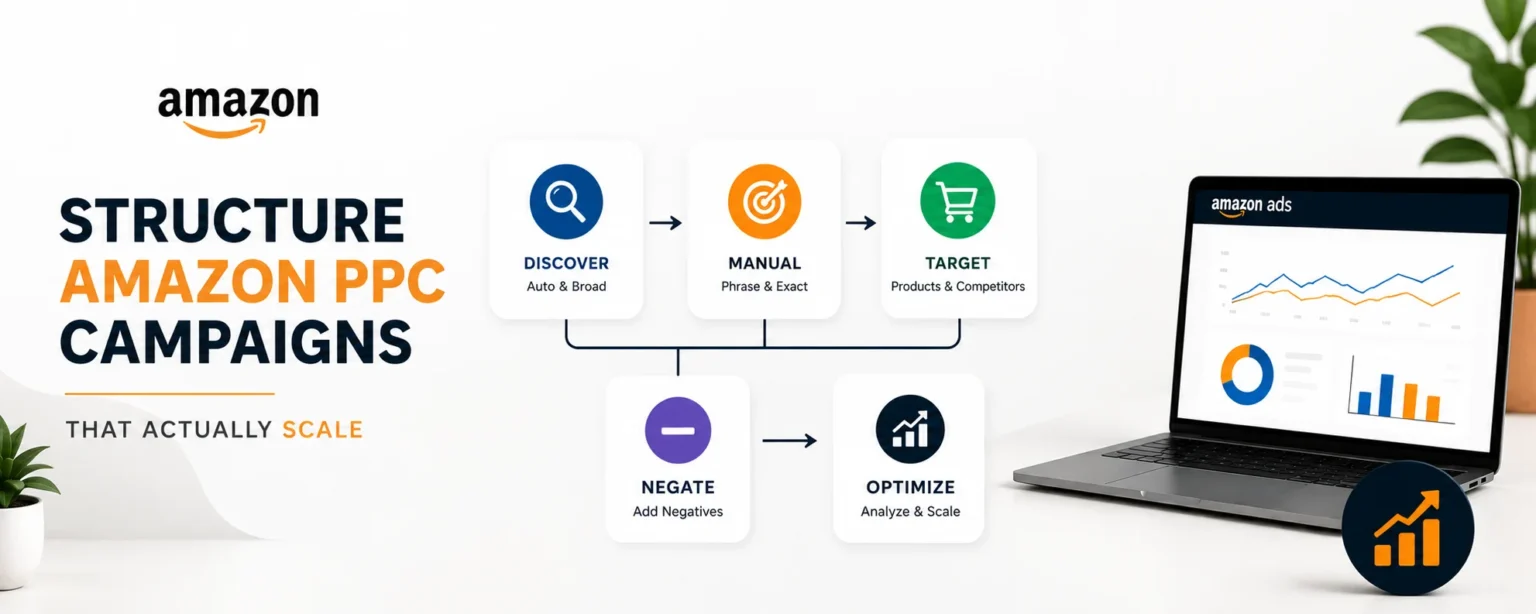
Skip any one of these layers and your account will eventually hit a wall. Build them right from the start, and your optimization decisions carry their own logic rather than requiring guesswork each cycle.
Understanding which campaign types belong in your account
Your Amazon PPC campaign structure starts with knowing what each campaign type does and when to activate it. Running all three from day one without a plan wastes budget. Running just one leaves revenue on the table.
Sponsored Products ads appear directly in search results and on product detail pages, driving the majority of direct-response sales for most brands. Every product in your catalog needs a Sponsored Products foundation before you layer anything else on top. They should receive your largest budget allocation and launch first, period.
Sponsored Brands run at the top of search results and link to your storefront or a custom landing page. These campaigns serve an awareness and consideration function, not a direct conversion function. They’re not the right tool for a brand-new product with no reviews, but they’re essential for defending branded search terms and driving storefront traffic once your catalog has established traction.
Sponsored Display targets shoppers based on browsing behavior and ASIN-level product pages rather than keyword searches. Use these campaigns to retarget previous visitors to your listings, place ads on competitor product pages, or close the loop on shoppers who viewed your product but didn’t convert. Treat Sponsored Display as a supplementary layer. It performs efficiently at scale but is not a launch priority.
How should I structure my Amazon PPC campaigns: match type architecture
The most common structural mistake in Amazon PPC is mixing match types in the same campaign. When auto, broad, phrase, and exact keywords sit together, you can’t see which targeting type is driving conversions, and you can’t optimize bids intelligently. The fix is straightforward: each match type gets its own campaign.
Auto campaigns are discovery engines. Manual broad and phrase campaigns expand reach in a more controlled way. Exact match campaigns are your conversion workhorses once you’ve identified proven terms from your search term reports. Each of these roles demands separate budgets, distinct bids, and independent optimization rules.
The allocation changes by phase. At launch, you need more discovery, so a practical starting split puts auto campaigns at 50, 60% of budget, manual exact and phrase campaigns at 30, 40%, and product targeting campaigns at 10, 15%. As search term data accumulates over the first 30, 60 days, you shift budget aggressively toward exact match winners. Mature, scaled accounts often concentrate 60, 80% of their manual campaign spend in exact match, keeping auto running at a reduced budget purely to surface new keyword opportunities. The phase breakdown looks like this:
- Launch phase: auto-heavy at 50, 60% of budget, manual keyword campaigns at 30, 40%
- Growth phase: shift toward phrase and exact as winners emerge; add Sponsored Brands
- Scale phase: 60, 80% of manual spend in exact; auto narrows to 10, 20% of total budget
The core workflow connecting these phases is search term harvesting. Every one to two weeks, pull your search term report from auto and broad campaigns and identify converting search terms with acceptable ACoS. Move those terms into a manual exact match campaign with a higher, controlled bid.
Simultaneously, add those terms as negatives in the auto or broad campaign so budget doesn’t split between two campaigns competing for the same query. This cross-campaign negative discipline is what keeps your structure clean as the account grows.
Ad group segmentation and naming conventions that scale
How you name and segment your campaigns determines whether your account is manageable at 20 SKUs or turns into an unnavigable mess at 50. The naming convention isn’t cosmetic; it’s operational infrastructure that either saves or costs you hours every week.
One SKU per ad group is the non-negotiable baseline. Each ad group should contain a single ASIN or a tightly related set of variants like color or size options for the exact same product. Mixing unrelated ASINs in one ad group corrupts your relevance signals and makes it impossible to see which product is spending what. This applies whether you have 5 SKUs or 500.
Agencies managing large catalogs use a structured naming format that encodes the ad type, targeting method, product identifier, match type, and campaign goal. A practical format looks like this:
[Ad Type] | [Targeting Type] | [SKU/ASIN] | [Match Type] | [Goal]
Real examples using this format:
SP | Auto | B07PY7GLKV | Discovery | Launch
SP | KW | MoonLamp01 | Exact | Profit
SB | KW | BrandName | Phrase | Defense
SD | Product | B07PY7GLKV | ASIN | Conquest
This convention makes bulk filtering, sorting, and reporting fast regardless of account size. It also makes campaign intent immediately readable to anyone on the team managing the account, which matters when you’re reviewing 200 campaigns and need to make quick optimization decisions.
For multi-SKU accounts, group campaigns into portfolios by product line or business objective. A clean hierarchy follows this pattern: Brand portfolio, then product line, then individual SKU campaigns organized by type and match. This is exactly how ZIWLD structures client accounts, so every optimization decision has a clear context and wasted spend gets caught at the campaign level rather than buried in aggregate account data.
Budget and bid allocation across your campaign structure
Allocation decisions change depending on where you are in the product lifecycle and how much data you’ve accumulated. Putting money in the wrong places at the wrong phase is one of the fastest ways to hit an ACoS ceiling you can’t explain.
During the launch phase, distribute budget to match each campaign’s role. For a $1,000/month ad budget, a practical starting split looks like this:
- Auto campaigns (discovery): $500, 600/month
- Manual keyword campaigns (exact and phrase): $300, 400/month
- Product targeting campaigns (competitor and category placements): $100, 150/month
Bid strategy follows the same logic. Auto campaigns use a single default bid applied to the whole campaign, so set it conservatively at roughly 20, 30% below what you’d pay for a proven exact match keyword. Manual keyword campaigns allow per-keyword bids, so start with a dynamic bid strategy and let data guide adjustments. Product targeting campaigns allow per-ASIN or per-category bids; start moderate and narrow down to the ASINs and categories producing efficient traffic.
Once you have 30, 60 days of performance data, shift budget toward proven performers. Manual exact match campaigns showing consistent ACoS within your target range should receive the largest share of any budget increase. Auto campaigns retain a maintenance budget to keep the discovery funnel open, but they should no longer hold the majority of your total spend.
Negative keyword hygiene: the habit that keeps your account efficient
A well-structured Amazon PPC campaign architecture deteriorates without ongoing negative keyword management. Without it, budget leaks into irrelevant queries at a rate that compounds every week, and what looked like a clean account at launch becomes a mess of wasted spend by month three.
Negative exact match prevents a campaign from showing for a specific query. Use it when a search term is generating clicks but zero conversions over a meaningful sample size, typically 10, 15 clicks with no sales. Negative phrase match blocks any query containing that phrase; use it when an entire category of terms is irrelevant. If you sell premium kitchen knives, negating “cheap” as a phrase match blocks all queries containing that word across the campaign.
Pull the search term report weekly during the first 90 days and monthly after the account stabilizes. Every review session produces two outputs: terms to harvest into exact match manual campaigns for converting queries with acceptable ACoS, and terms to add as negatives for high-spend, low-conversion queries. This workflow is the single highest-leverage optimization habit in Amazon PPC management. Everything else scales on top of it.
Cross-campaign negatives deserve special attention. When you harvest a term from auto into manual exact, add that term as a negative exact in the auto campaign. This prevents both campaigns from bidding against each other on the same query, which inflates CPCs and splits your conversion attribution. Apply the same logic when graduating terms from broad or phrase campaigns into exact match.
Your 30/90-day optimization roadmap with ACoS and TACoS benchmarks
Structure without execution is planning. This roadmap gives you the specific actions to take in the first four weeks and months two through three, along with the benchmark numbers to evaluate whether your campaigns are actually performing.
Days 1, 30 are about building structure and collecting clean data. Launch your auto and manual keyword campaigns simultaneously. Set budgets conservatively. Do not optimize aggressively in the first two weeks; the algorithm needs impression and click data to calibrate. At day 14, pull your first search term report and begin negative keyword additions. At day 30, pull your second report and identify your first harvest candidates for manual exact match campaigns.
By day 31, you have real data to work with. The 2026 benchmark targets by major Amazon category give you a reference point for setting performance expectations:
- Health and household: ACoS ~36%, CVR ~13.2%
- Beauty and personal care: ACoS ~31%, CVR ~13.4%
- Home and garden: ACoS ~32%, CVR ~9.2%
- Electronics: ACoS ~30%, CVR ~9.4%
- Cross-category TACoS target: 8, 15% for healthy, scaling accounts
Compare your account against these benchmarks rather than guessing at what “good” looks like. Adjust bids on underperforming keywords, increase budgets on campaigns delivering within or below your target ACoS, and expand Sponsored Brands campaigns now that conversion data supports your keyword choices. By day 90, your exact match campaigns should carry the majority of your manual spend, and your account structure should be running on clean data rather than launch assumptions.
The structure is the strategy
Now you know how to structure your Amazon PPC campaigns to scale efficiently. A well-built account isn’t more complicated than an unstructured one; it’s organized deliberately. When each campaign has a clear role, whether that’s discovery, conversion, brand defense, or retargeting, optimization decisions carry their own logic rather than requiring guesswork each cycle. You know exactly where to look when something underperforms, and you know exactly where to put budget when something works.
The framework outlined here covers campaign type segmentation, match type layering by phase, consistent naming conventions, disciplined budget allocation, and regular negative keyword hygiene. These aren’t advanced tactics reserved for eight-figure brands; they’re the baseline structure that separates accounts that scale from accounts that just spend.
If you’re managing 30 or more SKUs, running campaigns across multiple ad types, and spending more than five hours a week on PPC management, the optimization work has likely outgrown what a solo founder can sustain alongside running a business. ZIWLD builds and manages exactly this kind of segmented, data-driven campaign architecture for brands that want the structure done right from day one without the operational burden of running it themselves. Start with a free Amazon listing and account audit to see where your current setup is leaking spend and where the fastest wins are hiding.
Frequently asked questions
Which is better for a new Amazon product launch: PPC or Organic SEO?
Both strategies are important. Amazon PPC helps generate immediate traffic and sales, while Organic SEO improves long-term rankings and sustainable visibility. Using both together delivers the best results for a successful product launch.
How long does Amazon Organic SEO take to show results?
Amazon Organic SEO usually takes several weeks or months, depending on your competition, keyword strategy, listing quality, and sales performance. Consistent optimization helps improve rankings over time.
Should I stop Amazon PPC after my product starts ranking organically?
No. Even if your product ranks organically, Amazon PPC can help maintain visibility, protect your rankings, and reach more potential customers. Many successful Amazon sellers use both strategies together.
Can Amazon PPC improve my organic rankings?
Yes. A well-managed Amazon PPC campaign can increase product visibility, generate more sales, and improve customer engagement. These performance signals may contribute to better organic rankings over time.
How can ZIWLD help with Amazon PPC and Organic SEO?
ZIWLD provides professional Amazon PPC management, Amazon SEO, listing optimization, keyword research, and account management services to help sellers launch products successfully, improve rankings, and increase long-term sales.